If your bot has stopped logging into Second Life, the most common cause is an expired subscription. This guide covers how to tell, how to pay, and how to get the bot back online.
How to Tell Your Bot Has Expired
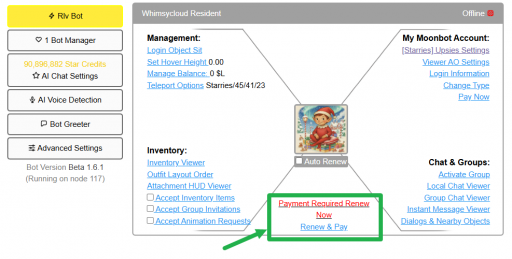
Open the bot's dashboard page. If the subscription has lapsed, you will see the bot marked Offline with a red expired flag, and a Payment Required Renew Now link in place of the usual options.
Renewing Your Bot
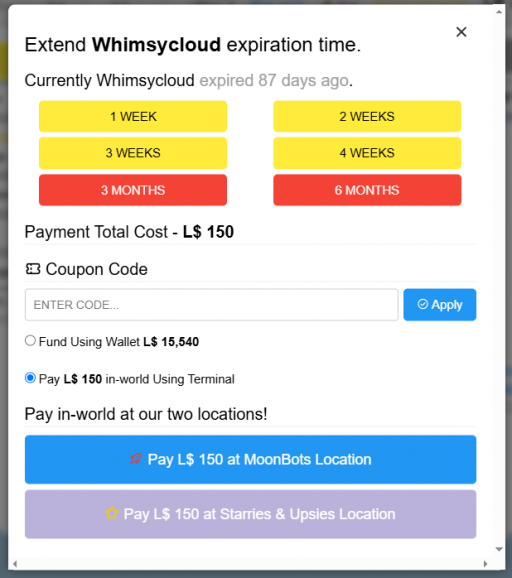
Open the bot's dashboard page.
Logging Your Bot Back In
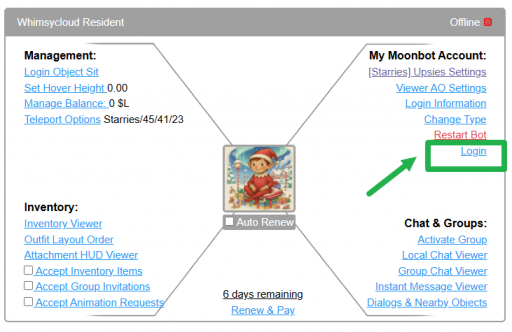
Once payment goes through, log the bot back into Second Life using either of the following:
Still Having Login Issues
If the bot still will not log in after paying, contact MoonBots support with the bot's name and your account name.
A few cookies keep you logged in and block bots, so those always run. Everything else stays off until you allow it: loading PayPal checkout, and any analytics we might add later. See our Cookie Policy.
Turn each purpose on or off. Nothing outside "strictly necessary" runs until you allow it, and you can change this whenever you like from the Cookie Settings link in the footer.
Keeps you logged in, protects the site from bots and abuse, and remembers settings you have deliberately changed, such as dark mode. Without these the site does not work.
PHPSESSID (login session, ends when you close the browser), cf_clearance (Cloudflare bot protection, 12 months), mb_consent (stores this choice, 6 months), theme and wm_dismissed (written only when you switch the theme or dismiss a notice, so they record a choice you made)
Loads PayPal so you can add funds to your wallet. PayPal stores data on your device to process the payment and detect fraud. If this is off, the PayPal checkout will not load until you allow it.
__paypal_storage__ and related PayPal storage, set by paypal.com
Measures which pages get used so we can improve them. Off by default and not in use today. The toggle is here so nothing can start without asking you first.
None in use today
Builds a profile of your interests to show you ads elsewhere. Off by default and not in use today.
None in use today
 MoonBots
 [Starries]